Using the MMBasic interpreter on a Pico
See Adafruits description at:
Get the wireless version of Pico, the other one is of limited use.
MMBasic keeps only one copy of the program we are working on, but it is useful during program development to be able to save older versions of our software as the final application is developed, in case we need to go back to an earlier version. Also, we can swap cards for different projects, and for backups, and easily move software between Picos.
An SD card reader/writer is a good place to keep your programs during software development.
The SD card receptacle we will use is from Pimoroni and they call it a “Breakout Board for microSD Card” and it has the part number POL-2597.
We will use it in SPI mode, because this is what the MMBasic manual suggests, because in SPI mode it is supported by MMBasic.
Our connection to the Pico is as follows:

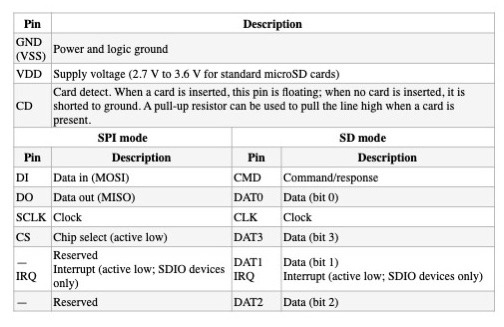
There are a number of ports and pins that can be used and we need to tell MMBasic which pins we are in fact using for the interface. This is done using the OPTION command thus:
OPTION SYSTEM SPI GP10, GP11, GP12
where the GP numbers are for Clock, MOSI and MISO respectively
Then MMBasic needs to know which pin is used for the Chip Select signal, so we tell it:
OPTION SDCARD GP13
Because OPTION is only read at switch-on time, disconnect the power, then reconnect it. The SD read/write unit is now live
The card was formatted as FAT32, and it’s capacity is 16Gb.
When you type EDIT at the Basic prompt, the editor that is built into the Pico allows us to write a Basic program, or edit the program that is currently already in the Pico’s memory. The function keys are used to save it, but this saves it in the Pico’s memory, and not the SD card.
When we use the f1 (save) key, the program is saved to flash memory, and the editor is closed. Control is then returned to the command line Basic, signified by a >
With our program now safely stored in the Pico’s flash memory, it will now survive a power down of the Pico,
But we can only save one program in this way. However we can also save the program on our SD card as it still exists, even though it isn’t displayed on the screen. To do that, enter:
SAVE “PROGRAMNAME.BAS
To see if the program actually got saved on the SD card, we can enter FILES and a listing of the files and directories in the SD card is displayed.
We can end the editing session by pressing ESC
The Pico responds with a question to see if we want to:
Exit and discard all changes (Y/N):
If we enter Y then the screen is cleared but our program remains in the Pico
So on entering EDIT again, the program is retrieved from the Pico’s memory. In this way, edits can be removed from the current session and a previously saved version of the program can be loaded.
If we type NEW, the program is deleted, and is no longer in the Pico. It’s really gone. But it is still on the SD, so it can be re-loaded into the Pico by entering:
LOAD “PROGRAMNAME.BAS
In this way, files can be saved to the SD card, and re-loaded afterwards so earlier versions aren’t destroyed. Moreover the card can be read by a different computer. This can be used to get printouts if needed.
The home of MMBasic is at: https://mmbasic.com/
A PDF user manual is at: https://geoffg.net/Downloads/picomite/PicoMite_User_Manual.pdf
 Pi-stuff